
From your Slerp Controls Dashboard, you can decide which types of vehicles—Bike, Motorbike, or Car/Van—are available for your deliveries, and define clear rules so that the right vehicle is automatically selected for each order. This ensures that smaller orders can be handled quickly and efficiently by bikes or motorbikes, while larger, higher-value baskets are assigned to cars or vans that are better suited to bulkier packaging.
💡 The delivery fees quoted to customers at checkout id based on the vehicle settings that are enabled. E.g. if car is set to £150, the delivery fee charged to the customer will reflect the standard courier fees applicable for cars.
How do I access this feature?
Login as Admin to Controls → Settings → Delivery tab
Or use this Quick Link ⚡ Delivery Tab
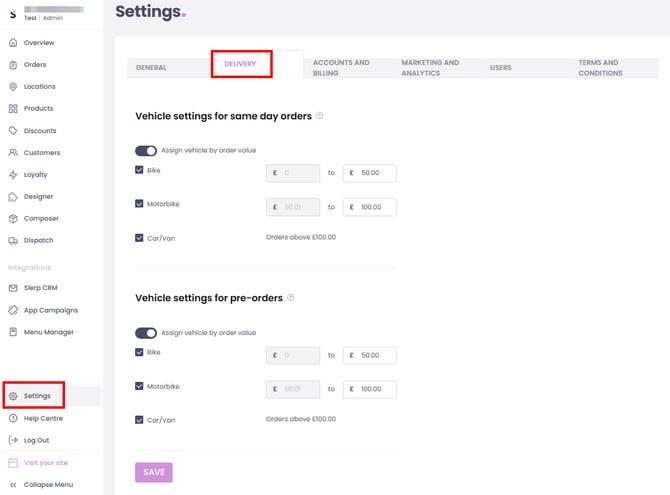
Available delivery vehicle types
You can configure the following vehicle types for deliveries:
- Bike
- Motorbike
- Car/Van
Rule:
- High basket value usually means larger or heavier packaging, which may not be suitable for bikes/motorbikes.
- It is recommended to map vehicle type to basket value ranges.
You can also configure vehicle rules separately for Same Day and Pre-order deliveries, giving you even more flexibility to match your operational needs.
For example, you might choose bikes and motorbikes for Same Day orders to maximise speed and coverage, while reserving cars or vans for Pre-orders that often include bulkier items such as whole cakes or large catering trays.
This allows you to tailor your delivery setup to the type of orders you receive across different fulfilment windows, ensuring the right vehicle is always used for the right job.
System behaviour after configuration
- After configuration:
- System action: The system automatically reserves a courier whose vehicle type matches your configured preferences and the order’s basket value.
- Before accepting a new order:
- Manual override: You can manually switch the vehicle type before you accept the order.
Performance and recommendation
- If the enabled vehicle type is restricted to only one vehicle (e.g. only Car/Van), courier-finding time may increase.
- Recommendation:
- Select both Bike and Motorbike where possible to broaden available courier options, as Bike and Motorbike drivers are typically more numerous than Car/Van drivers.
⚠️ Please note that our partner fleet can only reliably guarantee Car/Van availability when bookings are made at least one day in advance. For Same Day orders where a Car/Van is requested, there is a likelihood that the delivery will instead be fulfilled via Split (multiple bikes/motorbikes), depending on live availability at the time, and to reduce potential delay for the order.