
How do I access this?
Login as Admin on Controls → Settings → General
Or use this Quick Link ⚡General Settings
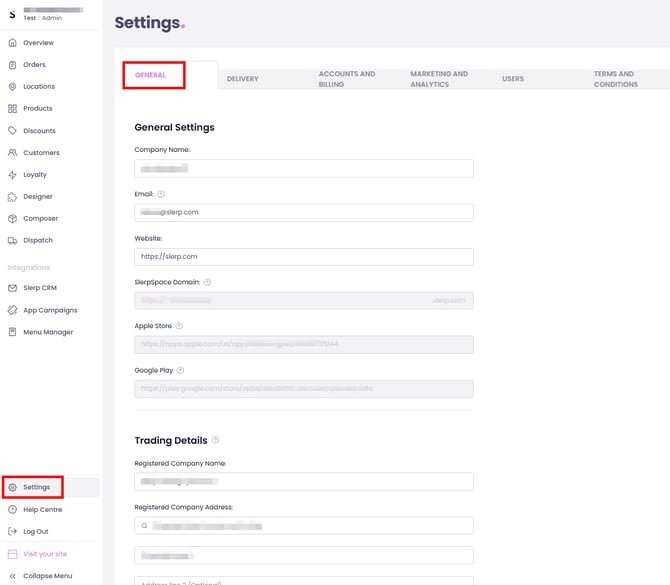
1. Company Information
These fields define how your brand appears across your Slerp Space and how we contact you.
Company Name
- What it is: The name of your business or brand (e.g. “Slerp Ltd”).
- Where it appears: Used across your Slerp Space and in some customer-facing contexts.
- Best practice: Use the name your customers recognise from your storefront, website, and marketing.
Company Email
- What it is: The main contact email for your business.
- How it’s used:
- Primary contact for account communication and important notifications.
- May be used as a point of contact for customer queries, depending on your setup.
SlerpSpace Domain
- What it is: The web address of your Slerp online ordering site (e.g. yourbrand.slerp.com).
- How it’s used:
- This is the URL you share with customers for online ordering.
- May appear in emails, marketing, and linking from your main website.
- Best practice: Keep this consistent with your brand name so it’s easy for customers to recognise.
Website URL
- What it is: Your main website address (e.g. https://www.yourbrand.com).
- How it’s used:
- Can be surfaced in some customer communications or information pages.
- Helps link your Slerp Space back to your main brand site.
2. App Store Links (If You Have a Customer-Facing App)
If your brand has a customer-facing app provided by Slerp, your app link will be here.
iOS App Store URL
- What it is: The direct link to your branded iOS app on the Apple App Store.
- How it’s used: Can be used in communications, “Download our app” prompts, or marketing materials linked from Slerp.
Google Play Store URL
- What it is: The direct link to your branded Android app on Google Play.
- How it’s used: Similar to the iOS link, this makes it easy for customers to find and install your app.
3. Trading Details
The Trading Details section is essential if you want to provide VAT invoices or show formal company details to your end customers. These fields should match your official company registration documents.
Registered Company Name
- What it is: Your legally registered company name (e.g. as listed at Companies House).
- Why it matters:
- Appears on VAT invoices and formal documentation.
- Must match your legal entity for compliance and accounting.
Registered Company Address
- What it is: The official registered address of your business.
- Why it matters:
- Required on VAT invoices and tax documentation.
- Helps customers and auditors identify the correct legal entity.
Company Phone Number
- What it is: Your main business contact phone number.
- Why it matters:
- May appear on invoices or customer communications.
- Provides a clear contact route for queries related to orders, payments, or invoices.
Company Registration Number
- What it is: Your official company registration number (e.g. from Companies House).
- Why it matters:
- Often required on VAT invoices.
- Confirms your legal trading entity for accountants, auditors, and some B2B customers.
VAT ID
- What it is: Your VAT registration number (if applicable).
- Why it matters:
- Required if you plan to provide VAT invoices to customers who placed orders through your SlerpSpace.
If you intend to offer VAT invoices to your end customers, make sure all Trading Details are completed accurately. Your accountant or finance team should be able to confirm the correct values for each field.
4. Best Practices
- Keep all details up to date when your company name, address, or VAT status changes.
- Double-check spelling and formatting for items like VAT ID and Registration Number to avoid invoice or compliance issues.