
What are Product Availability Groups?
Availability groups let you mark multiple items of the same type (products or modifiers) as in or out of stock at the same time, instead of toggling each item individually throughout the day.
They are especially useful when:
- You have large inventories per location.
- You regularly sell families of items (e.g. all “chips” items, all “house wines”, all “pastries”).
- You need to react quickly when something runs out mid‑service.
You can think of an availability group as an internal tag you add to related items, such as chips, wines, or pastries. Once that tag is on all relevant items, you can toggle the a whole group in or out of stock in one click per location.
- You can batch update all products and modifiers in that group from the Products inventory view.
Before you start: Key points
- Availability groups are configured on each product or modifier in Controls → Products.
- Each item must have the availability group added individually before it can be batch managed.
- Products and modifiers:
- Share the same availability group naming (e.g.
chips) if you want to treat them as one logical family.
- Share the same availability group naming (e.g.
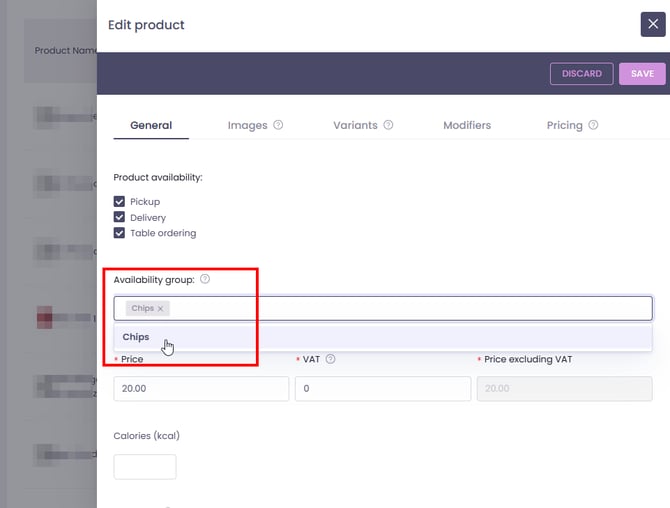
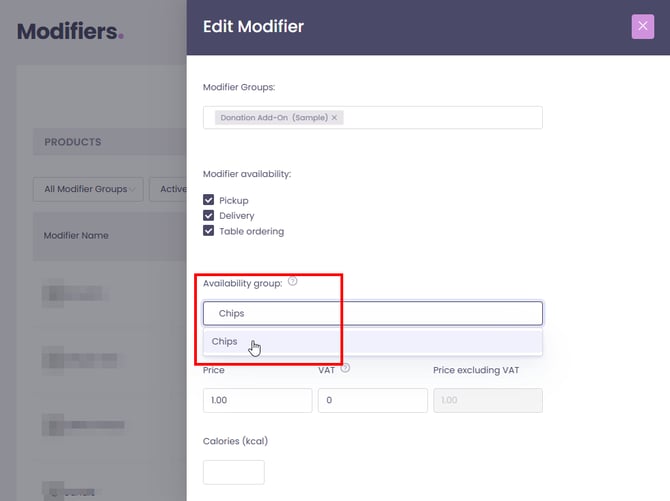
Once groups are set, you can batch manage products and modifiers by availability group from the inventory view.
How it works in practice
You have:
- 5 different chips products, and
- 3 chips modifiers.
Halfway through the day, they run out of potato products at their Roundabout location.
You can:
- Set an availability group called “Everyday” on all 5 chips products.
- Set the same availability group “Everyday” on the 3 chips modifiers.
- In the Roundabout Inventory:
- Go Products or Modifiers from the inventory dropdown → Hover to
Availability groupand Click to sort descending → batch toggle the “Everyday” group for products.
- Go Products or Modifiers from the inventory dropdown → Hover to
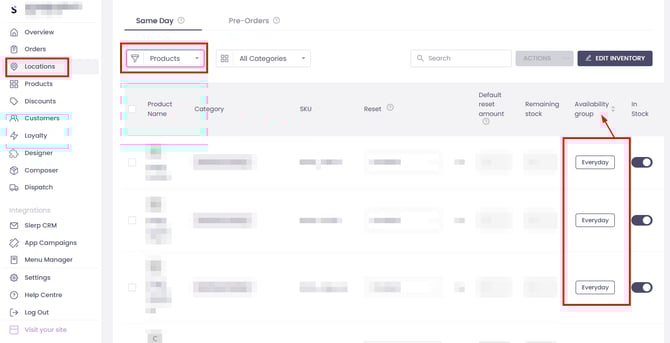
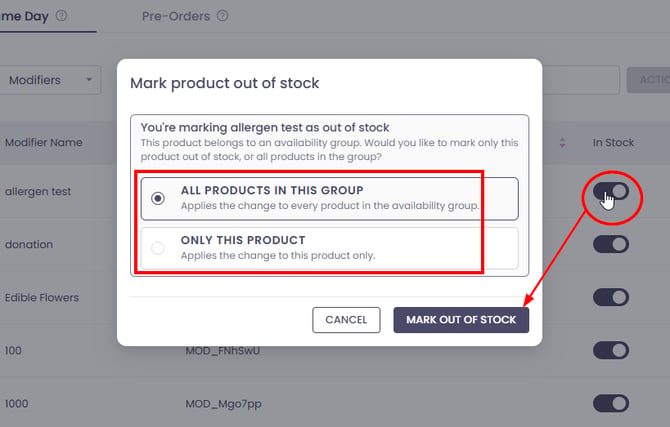
Products and Modifiers that are on the same availability group will update in one click, instead of 8 manual toggles.
Behaviour and limits
- Per location
Availability group changes are made per location:- Updating a group at one location does not change it at other locations.
- Pre‑orders vs Same‑day
As with regular inventory management, pre‑order and same‑day inventories remain independent. Check you’re editing the correct service type if both are in use.
FAQs
Do availability groups work for both products and modifiers?
Yes. You can assign availability groups to both products and modifiers. They are managed from separate inventory views (Products vs Modifiers), but you can use the same group name to keep them linked as a group.
Can I update products and modifiers in one single click together?
Yes. Just keep in mind that the batch update works on items that share the same exact group name.
Do I have to use availability groups?
No. You can continue to manage availability item by item. Availability groups are there to save time when multiple related items change status together.
Does this work from the Partner app / tablet?
Not yet. Batch updating by availability group is currently only available in Controls (web). Partner app support will follow in a later release. Until then, partners can:
- Set up availability groups in Controls now, and
- Use Controls during service to batch‑manage availability.