
Use this to understand what the customer sees, and to remind customers that deliveries are real-life events involving drivers, traffic, and access to their address.
1. After the customer places a delivery order
As soon as the customer successfully places a delivery order online (web or app):
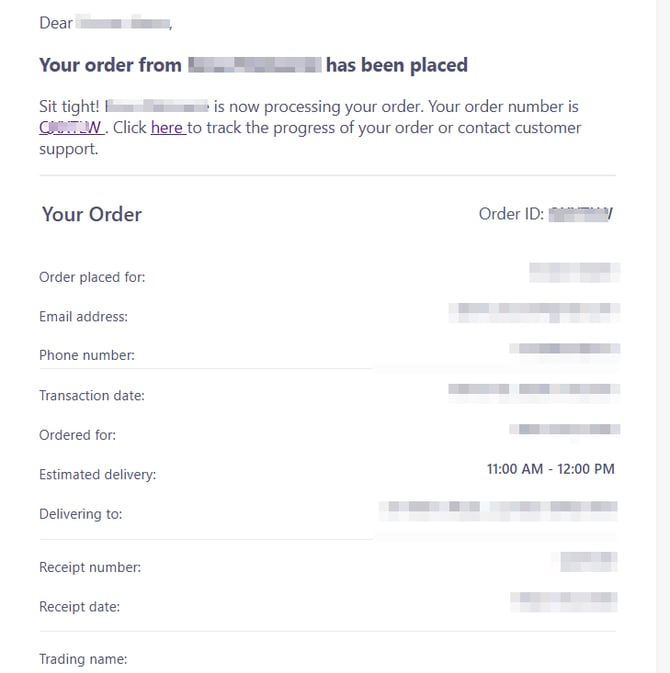
Order Confirmation Email
The customer receives a Confirmation Email that:
- Confirms the order has been submitted
- Shows the delivery date and time slot
- Includes an order tracking link where they can follow the status of their order
This is the first place customers should check if they are unsure whether their order went through.
2. When the store accepts the order
Once your team accepts the order in the Slerp Partner App or Controls:
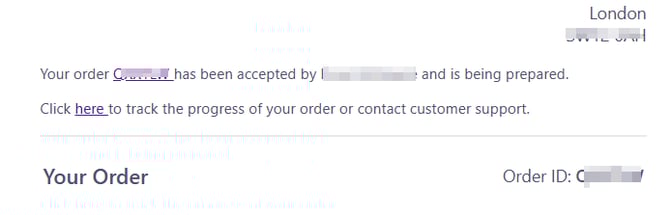
Order Accepted Email
The customer receives a second email confirming the order has been accepted.
This email:
- Confirms that the order is confirmed and being prepared
- Shows the delivery time slot
- Includes the courier tracking link (once it is available), so the customer can follow the driver’s progress
3. Before collection – looking for a driver
Dispatch automatically starts looking for a driver before the delivery slot begins:
- As early as 15 minutes before the delivery time slot, the system starts trying to assign a driver to collect the order from your store.
If a driver has not yet been assigned close to the start of the slot:
SMS: “We’re still trying to find a rider”
-
5 minutes before the start of the delivery time slot, if the order is still unassigned, an SMS is sent to the phone number on the order:
We’re still trying to find a rider for your delivery. We’ll let you know when they’re on their way.
Track it at [https://direct.delivery/tracking/SLERPX]
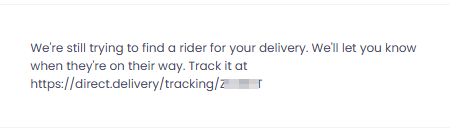
This message lets the customer know that:
- A driver has not yet been assigned, but
- We are still actively trying to assign one, and they can track progress via the link.
4. Once the driver collects the order
After a driver has collected the order from your venue:
SMS: “Your order is on its way”
The customer receives an SMS to the same phone number used on the order:
“Your order is on its way to you. Track your order at https://direct.delivery/tracking/SLERPX”
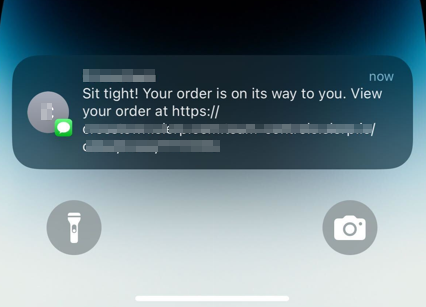
This tells the customer:
- The order has left your store
- The driver is en route, and
- They can see the live location and ETA via the tracking link
5. When the driver is almost there
As the driver approaches the customer’s address:
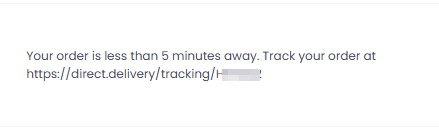
SMS: “Less than 5 minutes away”
When the driver is less than 5 minutes away, the customer receives another SMS:
“Your order is less than 5 minutes away. Track your order at https://direct.delivery/tracking/SLERPX”
This is a heads‑up / warning so the recipient can:
- Get ready to answer the door or phone
- Be prepared to meet the courier if needed (e.g. at building entrance, concierge, main gate)
This is important because drivers cannot wait indefinitely – they are often on multiple jobs and under time pressure.
For Dispatch Self‑Serve Enabled SlerpSpace
The same automated SMS' will be sent to the customers to inform them when: (1) Assigning a driver (2) The order has ben collected and is en route to them (3) The courier is 5 minutes away.
6. After delivery
Once the courier marks the order as delivered:
Delivery Confirmation Email
The customer receives an email confirming delivery, which typically includes:
- The order reference
- Confirmation that the order was delivered
- Delivery details and, depending on the courier, a short summary of the delivery status
At this stage, Proof of Delivery (e.g. photo at drop‑off) is also available via the tracking link and/or through Slerp Support if needed.
7. Extra contact from couriers (calls & SMS)
In addition to Slerp’s automated emails and SMS messages:
- Couriers may also contact the customer directly:
- Some courier partners require drivers to call the recipient if they have trouble with access (gates, building, flat, etc).
- Others may rely more on SMS to inform the customer or request instructions.
- Phone numbers are usually handled via the courier app, so the driver can call/SMS without seeing the raw number, to comply with GDPR.
This contact is part of ensuring the order can be successfully delivered when:
- The address is tricky to find
- The customer needs to come down to meet the driver
- A concierge or reception is involved
8. Customer responsibility for contact details & access
For deliveries to work smoothly, customers have responsibilities too:
-
They must provide:
- A correct email address (to receive confirmation and delivery emails)
- A correct mobile phone number (to receive SMS and any calls from couriers)
- A full, accurate delivery address, including:
- Flat / Unit Number
- Building or Company Name
- Any relevant access notes (e.g. use side entrance, leave with concierge, etc)
-
If the customer enters incorrect details (wrong phone number, incomplete address, wrong building) and this causes issues with delivery:
- Couriers may not be able to complete the delivery
- Claims and compensation for such issues are typically not honoured, as the failed delivery is due to incorrect or missing information from the customer.
You can refer customers to these responsibilities when they report delivery problems which are clearly due to incorrect contact details or inaccessible addresses.