
1. Who delivers my orders?
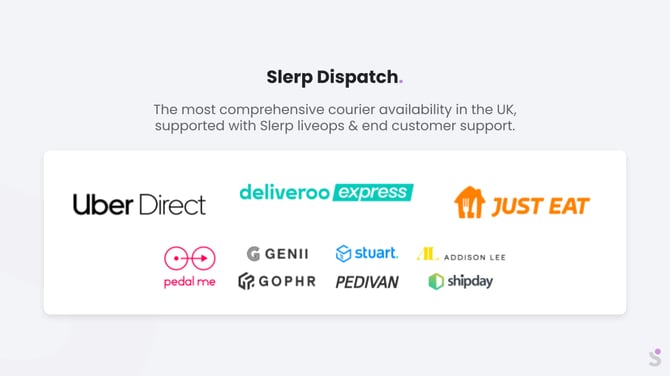
Slerp is integrated with several independent courier fleets. When you accept a delivery order, Slerp automatically sends the booking to one of these partners, who then allocate a driver (where available). Slerp does not own or employ the drivers who deliver your orders.
Motorbike / Bike Couriers (smaller packages, last mile)
Our main on‑demand bike/motorbike suppliers are:
These fleets are made up of self-employed drivers/riders. This means:
- Each driver can decide which jobs to accept or reject.
- Drivers may also accept other bookings from their platform while on shift.
- There are safety and operational standards in place, but we cannot force a specific driver to accept or prioritise a particular order.
Cars / Cargo Bikes (larger capacity or specific use-cases)
For larger capacity, catering orders, or specific vehicle needs, we also work with:
These providers are typically used when you require cars, vans, or cargo bikes, for example for larger or fragile orders.
2. When does the courier’s responsibility start and end?
Delivery is a real‑time operation and involves multiple parties: your venue, the courier partner/driver, and the end-customer.
-
Your responsibility (venue/vendor)
- Prepare the order on time.
- Keep the product fresh, safe and at the correct temperature until it is collected.
- Ensure that the order is packed safe for transport.
- Hand the correct, well‑packed order to the driver.
-
Courier responsibility
- Starts once the package has been handed to the driver at your venue.
- Continues until the package is handed over to the customer at the delivery address (or handled according to the courier’s standard procedures if the customer is unavailable).
- End-customer responsibility
- Provide accurate details when placing the order (full address, postcode, phone number, and any access instructions such as flat number, concierge, company name).
- Be available to receive the order during the selected delivery time slot, or clearly state what should happen if they are not (e.g leave with concierge”).
- Understand that drivers can only wait a short time at the address before they must move on to their next job, so delays in answering the door or phone can result in missed deliveries.
Before hand‑off, the order is your responsibility. After hand‑off, any issues related to transport, routing, or drop-off are typically under the courier’s remit (subject to their own terms and processes).
3. How ASAP, scheduled and pre‑order deliveries are booked
Delivery with Slerp courier partners is event‑based and depends on your prep-time and the customer’s selected slot.
There are two main behaviours:
ASAP (As Soon As Possible) orders
For ASAP orders, Slerp only starts looking for a courier after you’ve accepted the order and your prep time has elapsed.
Example
- Your prep time: 15 minutes
- Customer places order at: 09:10
- You accept the order at: 09:15
- Courier search starts at: 09:30 (09:15 + 15 mins prep-time)
In other words:
Courier booking time = time of acceptance + your set prep-time
This gives your team enough time to prepare the order before the driver is expected to arrive for collection.
Scheduled and Pre‑order Time Slots
For scheduled and pre‑order deliveries, Slerp gives courier fleets a head start to help them assign drivers and reach you on time.
Example: Time Slot 08:30–09:30
- Customer-facing delivery window: 08:30–09:30
- Courier booking window:
- Earliest collection booking: 08:15
- Collection deadline booking: 08:30
This 15‑minute head start is used to:
- Allow the courier platform to find and assign a driver.
- Give the driver time to travel to your venue and arrive before the delivery window begins.
📝 SLA vs Exact Minutes
Delivery is a real‑time event. Traffic, parking, building access, and other factors can affect timings.
- The SLA is based on the delivery time slot, not on the exact minute the driver is assigned or arrives to collect.
- An order is typically considered on time as long as it is delivered within the customer’s selected time slot (e.g. by 09:30 in the example above).
- Being a few minutes earlier or later within the time slot is not treated as a breach of SLA.
What this means for you:
- For ASAP orders: Have the order prepared in line with your configured prep time, assuming the courier search starts once that prep time has elapsed after acceptance.
- For scheduled/pre‑orders: have the order ready and safely packed/stored before the courier collection window begins.
- In all cases: Keep the product fresh/warm/chilled as appropriate until the driver arrives, and treat the full customer time slot as the relevant SLA boundary, not an exact minute.
4. Why time Slot is essential to delivery radius
Time Slots and Delivery Radius work together. Choosing an unrealistic combination increases the risk of:
- Fewer couriers accepting the job
- Higher lateness risk
- More customer complaints
Default time slot options
- 30‑minute slot (e.g. 19:00–19:30)
- 1‑hour slot (e.g. 19:00–20:00)
Recommended radius vs time slot
As a guideline:
-
30‑minute time slots
- Best for a short radius:
- Up to ~2 miles
- Or drive-time up to ~15 minutes
- Suitable when:
- Your prep is reliable and on time
- Local traffic is predictable
- Access/parking is straightforward
- Best for a short radius:
-
1‑hour time slots
- Recommended for anything beyond ~2 miles or >15 minutes drive-time
- Gives the driver more time to:
- Park or safely stop their vehicle
- Walk into your venue and collect the order (even if there’s a short queue or staff delay)
- Navigate traffic, roadworks, building access, elevators, etc.
- This reduces customer friction and improves courier acceptance, because the job is more realistically timed.
⚠️Remember, drivers also need time to:
- Park or secure a bike/scooter/car
- Locate your venue entrance
- Wait briefly at the counter if there is a queue
- Reach the customer’s exact door, flat, or floor
Because of these real‑world factors, setting too short a time slot for a long or complex route can lead to more late orders, cancellations, or unaccepted jobs.
5. How to handle delivery issues
If you experience repeated issues with a particular delivery, or a customer reports a delivery problem to you (for example, extreme lateness, suspected non‑delivery, or damaged goods), please:
-
Gather key details and evidence
- Order ID / Reference
- Relevant time stamps (order placed, accepted, scheduled slot, reported delivery time)
- Any delivery notes or photos from the customer
- Any in‑store evidence you may have (for example, CCTV showing hand‑off to the courier or collection behaviour)
-
Check Proof of Delivery (POD) / tracking first
- Open the live tracking or courier information and check:
- Delivery time – was it within the agreed time slot?
- POD image(s) – photo(s) taken at the drop‑off location
- Treat the POD as your primary source of truth before assuming the order was not delivered.
- Example: If the time slot is 20:00–20:30 and the POD shows delivered at 20:29, this is on time, even if the customer says they were “only 5 minutes away from the shop”. This is not considered late.
- Open the live tracking or courier information and check:
-
If POD is missing or unclear
- If there is no POD image, the image is broken, or the tracking information looks inconsistent, do not make assumptions.
- Contact Slerp Support with:
- Order reference
- Time slot and any customer comments
- A note that POD is missing/unclear
- Slerp Support can access additional courier data and logs to help you understand what happened before you provide a resolution to the customer.
-
Then decide on a resolution
- Once you have all the facts (POD, timings, any in‑store evidence), you can decide whether the order appears:
- Delivered on time and correctly, or
- Potentially mis‑delivered / damaged / not delivered
- If needed, Slerp Support can advise you based on the courier logs and your own policies (whether to replace or refund) and/or chase the courier partner to take responsibility of compensating the order if mis-handled.
- Once you have all the facts (POD, timings, any in‑store evidence), you can decide whether the order appears:
This approach helps ensure you’re basing decisions on objective delivery data and evidence, not only on customer claims, while still resolving genuine issues fairly.
💡Best practices
To get the best results and minimise delivery issues:
-
Choose realistic time slots
- Use 30‑minute windows only for short, local deliveries (≤2 miles / ≤15 minutes drive‑time).
- Use 1‑hour windows for longer distances or areas with heavier traffic.
-
Prepare orders on time and store them correctly
- Have orders ready before the courier collection window starts.
- Keep hot food hot and cold items chilled until hand‑off.
-
Label and pack clearly
- Add the order reference and customer name to each package.
- Use packaging suitable for travel (leak‑proof, insulated where needed).
-
Understand responsibility hand‑off
- The order is your responsibility until you hand it to the driver.
- Once handed over, it falls under the courier’s responsibility until it reaches the customer.
-
Keep expectations realistic
- Treat the time slot as the SLA, not the exact minute of pickup.
- Expect minor variation inside the window due to traffic, parking, and access.