What is a VAT receipt?
A VAT receipt shows the amount of VAT charged on Slerp fees, including commission, delivery fees, payment processing fees, and any additional fees. VAT is collected at the time of the transaction, and there is no outstanding balance to be paid.
*The invoice is provided for your record-keeping only.
What can you use the VAT receipt for?
-
Reclaim VAT on eligible Slerp fees through your VAT return
-
Keep accurate financial records for accounting and bookkeeping
-
Provide documentation to your accountant for tax reporting
-
Verify the VAT charged on Slerp commission, delivery fees, payment processing fees, and other charges
How to download your VAT receipt
Partners can download their monthly VAT receipt directly from their Slerp dashboard.
1. Go to:
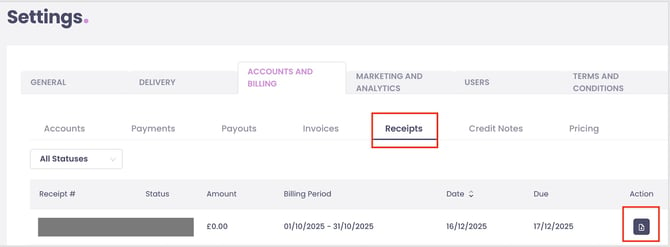
Settings → Accounts and Billing → Receipts
2. Find the billing period you need
You will see a list of monthly invoice receipts, including the amount, billing period, and status (Paid).
3. Download your VAT receipt
Click the document icon on the far right of the invoice row.
This will download the VAT receipt (PDF) to your device.