
What is Shipday?
Shipday is a driver management tool that let's you easily track driver locations and assign deliveries if you manage your own driver fleet.
How does a Slerp x Shipday integration work?
When you integrate your Slerp Shop Shipday, all Slerp self delivery orders for connected locations will be pushed in to your Shipday account. There, they will live alongside any other orders you may receive there and can be automatically assigned and dispatched to your driver pool.
How do i create a Shipday account
You can create your Shipday account here. Shipday offers a variety of cost-effective pricing plans - you can have a look here to see which one best fits your needs.
Please note that a Shipday <> Slerp integration requires at least a Professional subscription
How do I enable my shipday integration
* In your Controls Dashboard, find the Integrations tab 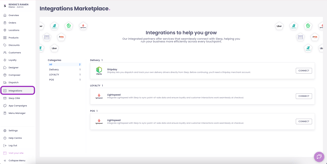
* Click Connect on the Shipday entry 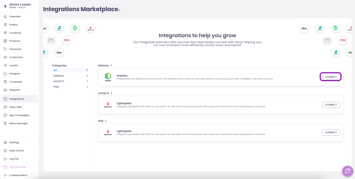
* You can now either create a new Shipday account, or continue with an existing one
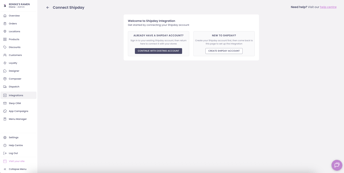
* Open your Shipday account, find the API key and paste it in Controls. Now click continue
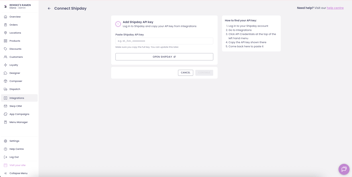
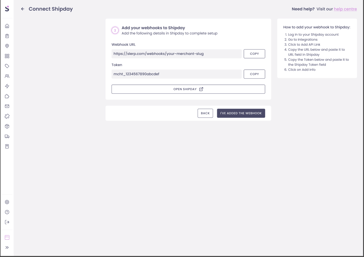
* Click Continue. You now see a Webhook URL and a token. Both of these will individually need to be copied to your Shipday Integrations. Click confirm once this is done
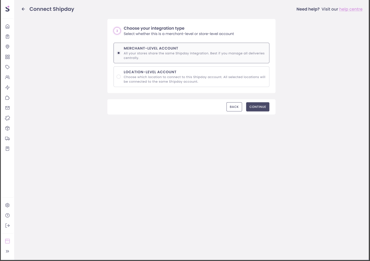
* Now choose your integration type. Select merchant level if you want all current (and future) locations that offer self delivery to be integrated to the same Shipday account. Select location level if you want a selection of your locations to be linked to the current Shipday account.
When connected, all self delivery orders for you connected locations will be pushed to Shipday, where you can seamlessly manage your self delivery fleet and logistics.
Order status and delivery updates will be synced back to Slerp, so your customers are kept up to date.