
Promoting your loyalty cards
Loyalty programmes are a great way to increase customer retention. Your checkout and app will automatically promote account creation and loyalty points for your. And with Loyalty Wallet Passes now available, it is easier than ever to convert your in store customers in to loyalty users too.
Checking your current set up
For the best customer experience, we advise updating your loyalty settings to partner scan in store. This will allow you to enable Wallet Pass and implement the recommendations on this page.
Find out how to enable your wallet pass HERE
Advertising your loyalty programme in store
Now, you can advertise your loyalty programme in store and capture off line customers. Get them access to your Loyalty Wallet Pass in seconds and reward customers from all sales channels with your rewards programme.
1. In Controls, visit your loyalty settings page
2. Find the Loyalty QR code. You can either print it as is, or download the QR image to design your flyers, posters, or any other promotional materials you would like to use
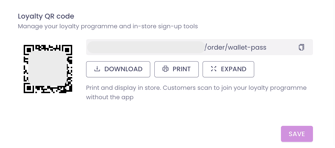
3. Customer scanning the QR code are guided to install your loyalty card on to their device wallet. Always nearby, even without an app installed!
4. Make sure your QR code is displayed throughout your shop, and included in leaflets and flyers for maximum reach
5. If needed, the same QR code can always be generated on the fly from your Slerp Partner App. Go to Settings > Loyalty QR Code