
Available vehicle types
You can configure:
- Bike
- Motorbike
- Car / Van
The system uses your rules to pick a vehicle based on the order basket value and fulfilment type.
Why basket value matters
Higher basket values usually mean:
- Larger or heavier orders.
- More or bigger packaging.
- Items that may not safely fit on a bike or motorbike.
To avoid damage and failed deliveries, Slerp lets you map vehicle type to basket value ranges.
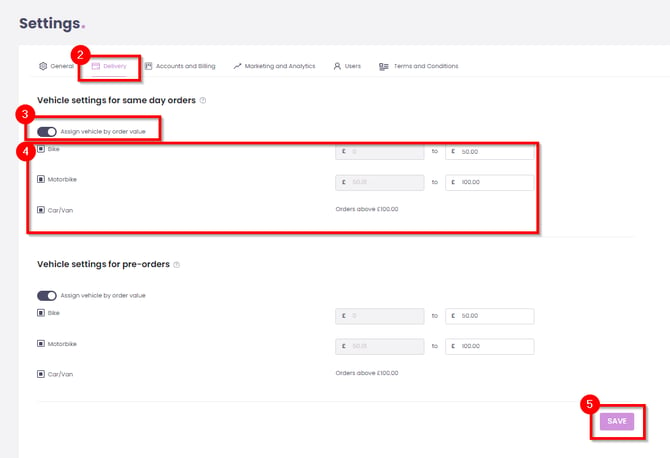
Step‑by‑step: Set vehicle rules
- Log into your Controls Dashboard.
- Then go to Settings tab.
- Open the Delivery tab.
- Enable Vehicle Settings for:
- Same Day orders, and/or
- Pre‑orders, depending on your needs.
- For each fulfilment type, configure basket value ranges, for example:
- Bike: £0 – £50
- Motorbike: £51 – £100
- Car/Van: £101 and above
- Save your changes.
System behaviour after configuration
Once saved:
- The system automatically reserves a courier whose vehicle type matches both:
- Your configured rules, and
- The order’s basket value.
You can configure different rules for Same Day vs Pre‑order to reflect different order profiles (for example, bulkier next‑day cakes vs smaller instant orders).
For more information about setting your deliveries, see: