
This helps you:
- See your most popular items at a glance.
- Decide which products to promote, feature, or upsell.
- Spot items that may no longer be worth keeping on the menu.
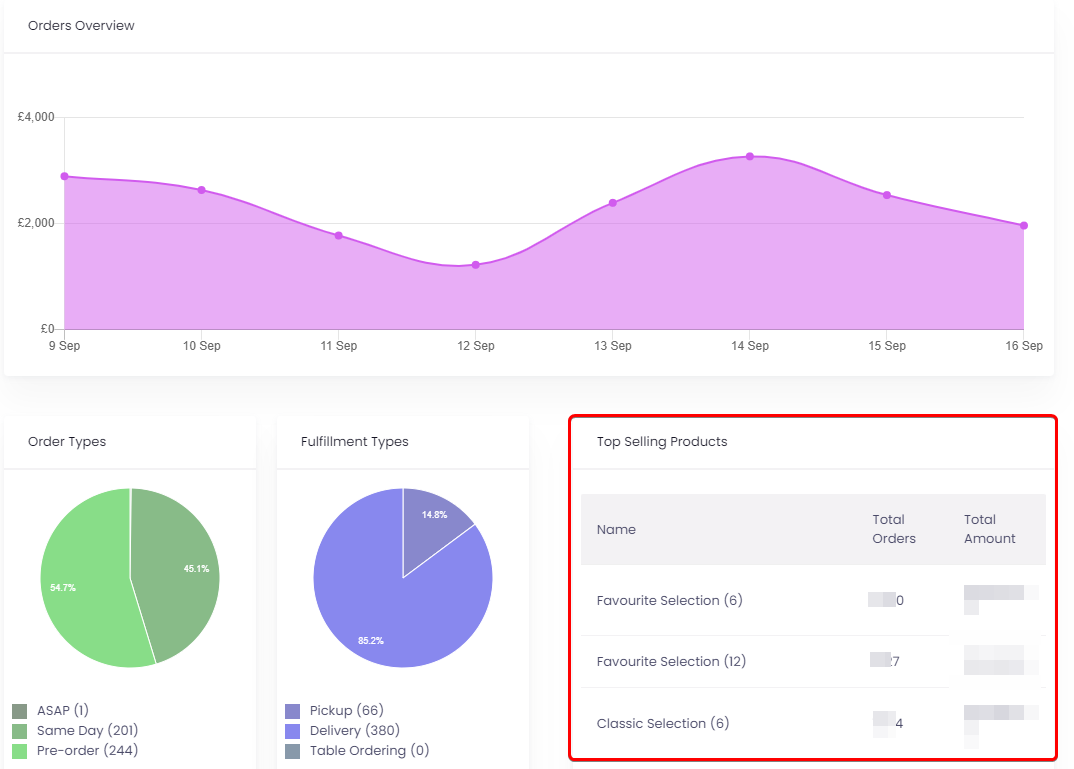
How to view your top-selling products
-
Log in to Slerp Controls
- Go to https://controls.slerp.com/ and log in with your details.
-
Open the Overview dashboard
- After logging in, you land on the Overview page by default.
- This page gives you high‑level Insights into orders, trends, and financials for your store(s).
-
Scroll to Top Selling Products
- On the Overview page, scroll down past Orders Overview.
- You’ll see a section called Top Selling Products.
-
- This section lists the products with the highest sales over the selected time period.
How to use this data
-
Highlight best sellers
- Consider featuring these products at the top of their categories or adding them to a Favourites or Top Picks section.
- They are ideal for checkout upsell and promotional activity.
-
Review underperforming items
- If some products rarely appear in Top Sellers, review whether they should:
- Be improved (better photo, clearer description, different price), or
- Be removed or hidden to keep your menu focused.
- If some products rarely appear in Top Sellers, review whether they should:
-
Plan stock and staffing
- Use top seller data to anticipate which items need more stock or prep, especially at busy times.
Related tools and views
- Insights – Analytics Page
- For a deeper breakdown of product performance by date range, channel, order type, and fulfilment type, use the Insights / Analytics page. This includes a Top Products Overview chart for more detailed analysis.
- For a deeper breakdown of product performance by date range, channel, order type, and fulfilment type, use the Insights / Analytics page. This includes a Top Products Overview chart for more detailed analysis.
- Checkout Upsell
- Slerp’s Checkout Upsell feature automatically suggests up to 5 popular products that are not yet in the customer’s cart, helping increase average order value using your top-selling items.