
Menu Synchronisation
Supported menu structure and mapping
Slerp supports syncing a different menu per store, or the same menu across all stores. Multiple menus per store are not currently supported.
Supported Product and Pricing Types
We support all Lightspeed Product types. Products can have multiple modifier groups and modifiers, with either a fixed price for the group or individual prices per modifier.
We do not support the following Pricing types
-
Manually-entered price
-
Manually entered negative price (There is an exception for fees)
-
Price as a percentage
Pricing by Fulfilment Type
Slerp supports setting different prices per fulfilment type, for example charging a different price for collection versus delivery. In Lightspeed, this is configured by assigning prices to an Order Profile.
To set this up in Lightspeed, navigate to Menu > Item List > select the product > Multiple Prices. From there, you can assign a price to each Order Profile.
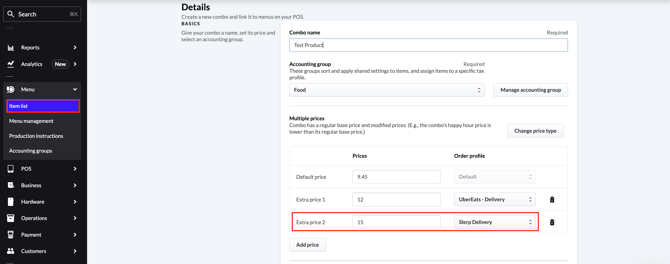
A couple of things to note:
- Pricing by fulfilment type is only supported for products. It is not supported for modifiers.
- The price type in Lightspeed must be set to Multiple Prices for this to work.
Once you have configured your prices, make sure you sync both the menu in Slerp and reload the POS. If either is not synced, orders containing that product may be rejected due to a price mismatch.
What is not synced from Lightspeed
The following must be configured directly in Slerp:
- Category special availability and cut-off times
- Category descriptions
- Product SEO descriptions (depending on your configuration, Slerp can generate these for you automatically)
Order Synchronisation
Slerp passes orders to Lightspeed when placed and listens for updates. For more details see here.
Store Configuration
Opening times, order types, and fulfilment types are not synced from Lightspeed and must be configured directly in Slerp. This can be done before or after linking your store to Lightspeed.
If you need to close your store or set special opening hours, this must be done via Controls or the Slerp Partner App.
Inventory Management
When a product is marked as out of stock in the Lightspeed POS, it will automatically be marked as out of stock in Slerp. Syncing stock counts is not currently supported.