
Overview
In Leat, a customer is given a voucher from a promotion and can use it without spending points. They can also buy a reward with their points. In Slerp, the same thing is a reward. For a customer to use a Leat voucher or reward on a Slerp order, each Leat promotion and reward must be linked to a Slerp reward. The Slerp reward decides what it is worth and where it applies. Leat decides who holds it.
Rewards are matched on a SKU. To set this up, you will need to:
- Connect Slerp to Leat. See How do I connect my Slerp and Leat account.
- Create a reward in Slerp with a SKU for each voucher or reward.
- In Leat, choose that Slerp reward on the matching promotion or reward.
Step 1. Create the reward in Slerp
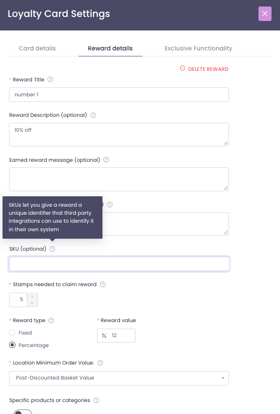
In Controls, go to Loyalty > Your Cards > Loyalty Card > Reward Details and create a reward, or open an existing one. Set what it gives, such as £5 off, and any conditions, such as a minimum spend or the stores it applies to. Make sure to set a SKU and that the loyalty card it is linked to is published and live. The SKU field is marked optional in Controls, but a reward without one cannot be linked to Leat.
Once the reward is saved with a SKU, it is sent to Leat. If two rewards have the same SKU, only the older is sent.
Step 2. Choose the Slerp reward in Leat
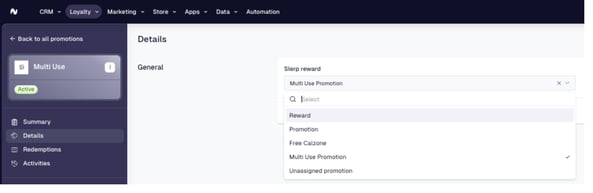
Slerp adds a field called Slerp reward to your promotions and your rewards in Leat. Link each one to the Slerp reward you created.
For a promotion
- In Leat, go to Loyalty and open the promotion from the list of promotions.
- Select Details in the left-hand menu.
- Under General, next to Slerp reward, select Edit.
- Choose the correct Slerp reward from the list and save.
For a reward bought with points
- In Leat, go to Loyalty and open the reward from the list of rewards.
- Select Custom attributes in the left-hand menu.
- Under General, next to Slerp reward, select Edit.
- Choose the Slerp reward from the list and save.
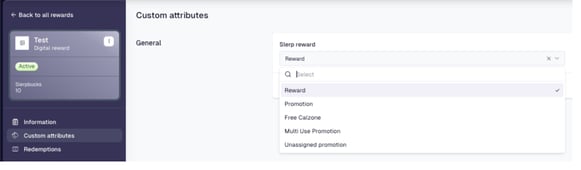
Your Leat promotion or reward is now linked to a Slerp reward, and customers can redeem it on Slerp. Repeat for every promotion and reward you want customers to use on Slerp.
Don't edit the Slerp reward options in Leat. Slerp manages them from your rewards and overwrites any change.
What customers see
A voucher appears at Slerp checkout as the Slerp reward it is linked to. It appears only when:
- the customer is signed in, and Leat knows about them;
- they have access to an active voucher, either an individual one or a multi-use voucher;
- the Leat promotion is linked to a valid Slerp reward;
- the customer's basket is eligible to apply the reward; and
- the store sends its orders to Leat. Stores with Push Order to Leat off, or no Leat Shop, do not offer Leat vouchers.
Good to know
- Changing what the reward gives, such as the amount off, happens only in Slerp and needs no change in Leat.
- A promotion or reward with no linked Slerp entity is not offered at Slerp checkout.
- If you delete the Slerp reward, vouchers linked to it are no longer offered.
- A Leat reward that customers buy with points is linked the same way. Customers buy it at checkout. See How do I redeem Leat vouchers, rewards and gift cards on Slerp?