
Use Special Availability to highlight seasonal menus, limited‑time products, or promotional categories by making them available only on specific dates and times. This helps you drive sales around key events while keeping full control over when categories can be ordered.
Once a Special Availability period ends, the category automatically stops appearing at checkout, so you don’t need to manually hide products or worry about accidental orders.
Benefits of Special Availability
- Automated on/off switching: Categories automatically appear and disappear based on your schedule.
- Flexible date ranges: Run multiple date ranges across multiple categories at once (e.g. festive menus, weekend-only offers).
- Fewer mistakes: Prevent customers from ordering special items outside of valid dates.
- Stronger promotions: Focus attention on specific categories during campaigns or peak periods.
- Better experience: Customers only see categories that are genuinely available for their chosen date and time.
How Special Availability works
- Special Availability is configured per category and per location.
- Only categories with an active Special Availability rule will appear during the date and time windows you define.
- Outside of those windows, the category will be hidden from checkout (unless you configure additional rules).
How to set up Special Availability via Availability Rules
- Log in to your Controls Dashboard.
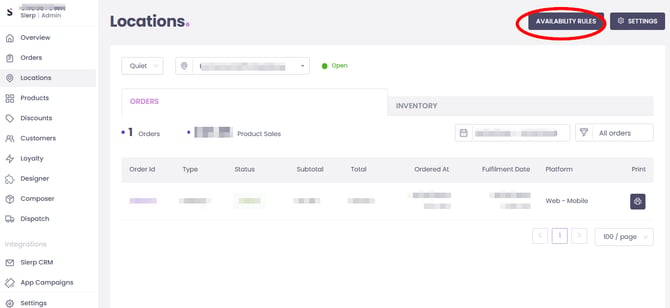
- Go to the Locations tab and select the location you want to configure.
- Click Availability Rules.
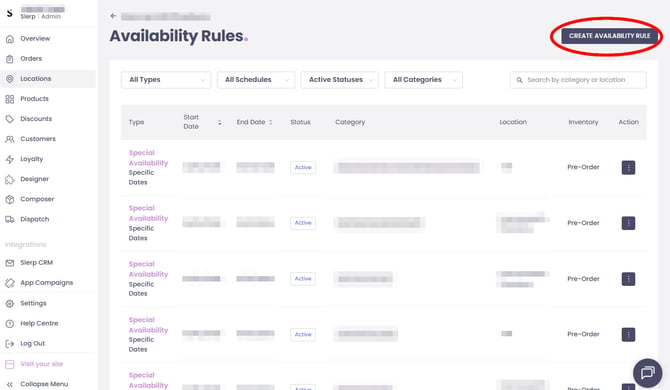
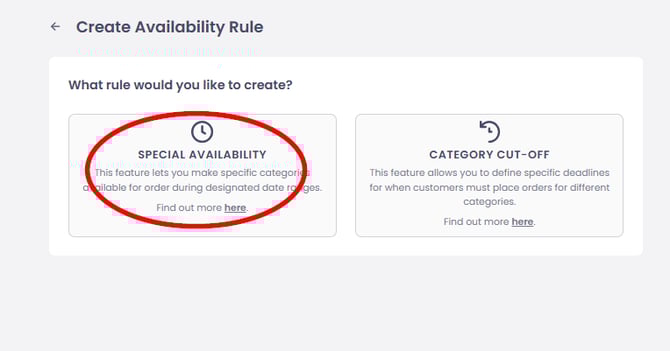
- On the Availability Rules page, click CREATE AVAILABILITY RULE and choose Special Availability.
In the rule setup form:
-
Select Categories and Locations
- Choose the category or categories this Special Availability rule will apply to.
- Confirm the location(s) that should use this schedule.
-
Choose the Schedule Type
- Ongoing – for availability rules that apply indefinitely (e.g. “every Friday”).
- Specific Dates – for a fixed campaign or seasonal period (e.g. “1–24 December”).
-
Configure Dates and Times
- Start date and end date:
- Required for Specific Dates schedules.
- Optional for Ongoing (you can leave end date open-ended).
- Days of the week:
- Enable or disable specific days (e.g. only Fridays and Saturdays).
- Time window per day:
- Set the start and end times when the category should be available (e.g. 10:00–14:00).
- Start date and end date:
-
(Optional) Apply to Multiple Locations or Pre-orders
- If supported in your setup, you can:
- Apply the rule to additional locations, so you don’t need to recreate it for each store.
- Apply the rule to pre-order inventory as well as same-day inventory, to keep behaviour consistent.
- If supported in your setup, you can:
-
Click Save to activate the Special Availability rule.
- The category will follow this schedule from the specified start date.
Example: Seasonal Platters category
- You want to make a “Christmas Platters” category available only from 1–24 December, Monday–Friday, 10:00–14:00.
- Create a Special Availability rule for that category with:
- Specific Dates: 1–24 December
- Days: Monday–Friday
- Times: 10:00–14:00
Result:
- During 1–24 December, customers selecting an eligible fulfilment time (Mon–Fri, 10:00–14:00) will see the Christmas Platters category at checkout.
- Outside those dates or times, the category is automatically hidden.
Working alongside Category Cut-Off Rules
Special Availability works together with Category Cut-Off Rules:
- A category will only appear if:
- It falls within its Special Availability date/time window, and
- Any cut-off time for that category has not passed.
Example:
- Special Availability: Platters available Mon–Fri, 10:00–14:00.
- Category cut-off: 3 days before at 17:00.
To order Platters for Wednesday:
- The customer must place the order by Sunday at 17:00.
- On Wednesday, Platters will be visible only for fulfilment slots between 10:00 and 14:00.