
① Payouts
How and when you receive your order revenue.
Payout Schedule
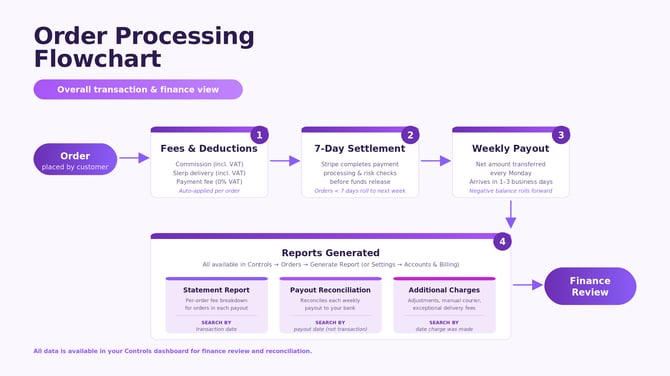
- Payouts are sent once a week on Mondays to your bank account.
- Depending on your bank, funds typically arrive within 1–3 business days.
Settlement Window (Important)
To be included in a Monday payout:
- An order must have been fully settled for at least 7 days before the payout date.
- Orders that settle less than 7 days before Monday will roll over into the next week's payout.
This 7-day settlement period allows Stripe to complete payment processing and risk checks before releasing funds.
How to View Your Payouts
Controls → Settings → Accounts & Billing → Payouts
How to Reconcile Payouts
To understand which orders are included and how fees were deducted, refer to our reconciliation guides:
Help Centre: Reconciliation Reports and Payouts to my bank
What’s Automatically Deducted From Payouts
Each payout already includes deductions for:
- Commission (incl. VAT)
- Slerp delivery fees (incl. VAT)
- Payment fee (0% VAT)
The net amount is transferred to your bank account
Order-Level Fee Breakdown
To see fees for a specific order:
Controls → Orders → Generate Report → Statement Report
Negative or Failed Payouts
- If fees exceed order income, payouts may appear negative.
- If the balance is insufficient:
- The negative payout will not be collected
- The amount will roll forward and be deducted from the next payout
- If still insufficient, you may be asked to top up your balance
- If a payout fails due to bank issues, Stripe will automatically retry
Useful Help Centre Links:
- Reconciliation Reports and Payouts to my bank
- Creating a Detailed Reconciliation Report
- Why is my Stripe Payout negative?
- Statements
② Invoices & Credit Notes
Your monthly platform fees, CRM charges, SMS credits and adjustments.
Where to Find Your Invoices
Controls → Settings → Accounts & Billing → Invoices
Invoices include:
- Monthly platform fee
- CRM subscription fees
- Usage-based purchases (e.g., SMS credits)
- Any ad-hoc items such as additional couriers
Credit Notes
Controls → Settings → Accounts & Billing → Credit Notes
Credit notes are issued for:
- Refunds
- Manual adjustments
- Manual payments made by partners
Credit notes automatically apply to future invoices.
Useful Help Centre Links:
③ VAT Receipts
Documentation for VAT claims related to order-associated fees.
Where to Find VAT Receipts
Controls → Settings → Accounts & Billing → Receipts
Each VAT receipt shows the VAT applied to order-associated fees such as:
Commission (Taxable)Slerp Courier Partner Delivery (Taxable)
Payment Fees (Non-Taxable)
A VAT receipt is for documentation only — there is no balance to pay.
Useful Help Centre Links:
④ Additional Charges
Extra fees outside the standard order fees.
Where to Find the Additional Charge Report
Controls → Orders → Generate Report → Additional Charges
This report details any extra charges added beyond standard order fees, such as:
AdjustmentsManual courier charges
Exceptional delivery fees
Useful Help Centre Links:
⑤ Support
If you need help with payouts, invoices, fees, or reconciliation, please contact:
📧 support@slerp.com
For fastest resolution, please kindly include:
Your Business & Store nameYour payout ID or invoice number (if applicable)
A brief description of the issue